Image uploads on a Go backend: R2 and orphan cleanup
Board icons started as one endpoint and ended up touching storage layout, image processing, cleanup jobs, and rate limiting. Here is the architecture.
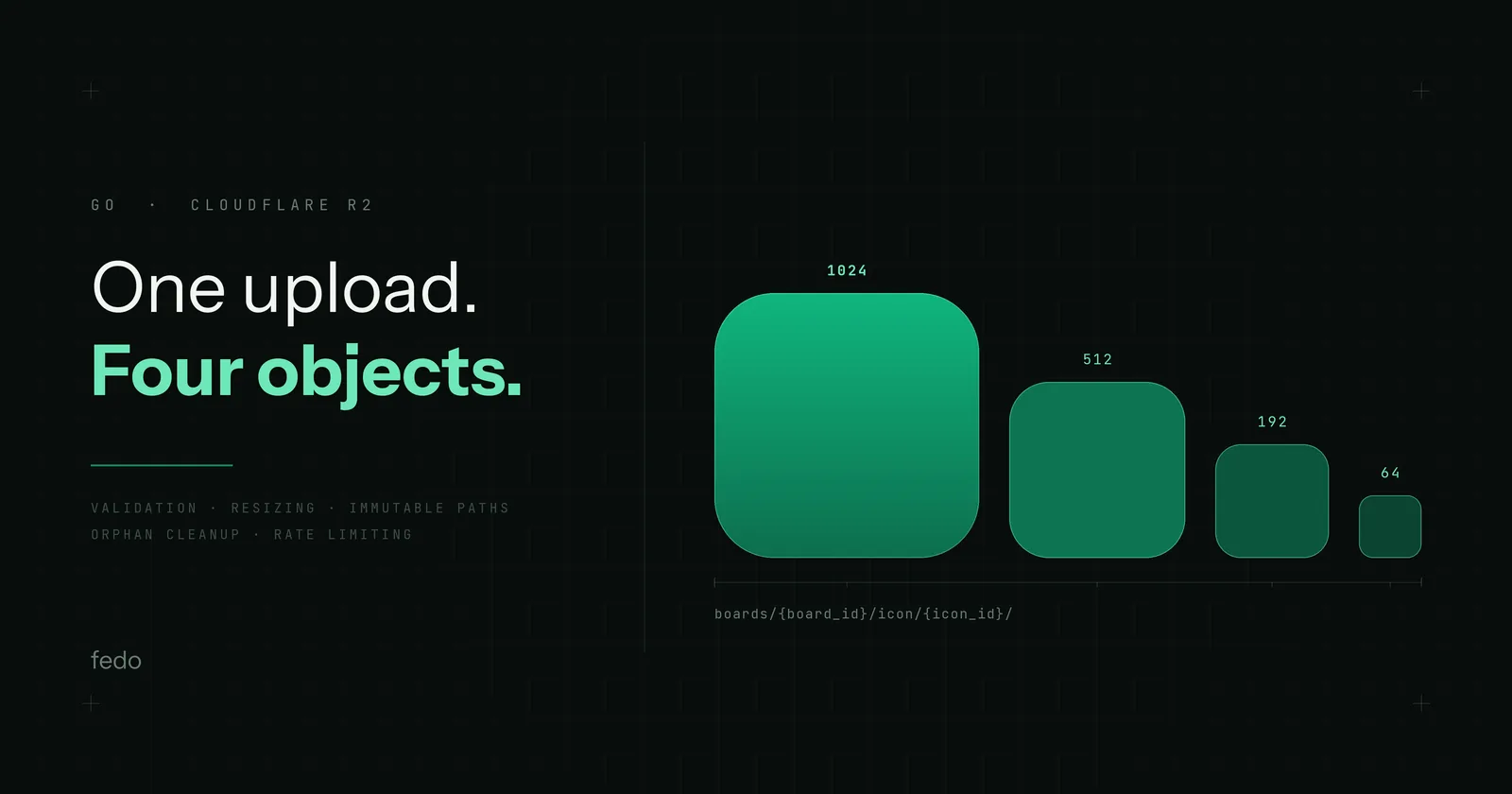
Board icon uploads on a Go backend came down to four decisions: keep the files in object storage rather than the database, key every upload under a fresh icon_id so a changed icon produces a new URL and cached copies never need invalidating, downscale one capped master into fixed variants instead of resizing per request, and run a cleanup job for the orphans that failed uploads leave behind.
Here is how I got to each of those, and what I would build the same way again.
Key takeaways#
- The files live in Cloudflare R2 across two public buckets, one per environment; the database stores only a nullable
icon_idon the board row. - The object key is
boards/{board_id}/icon/{icon_id}/image.png. A new upload mints a newicon_id, so the URL changes and previously cached copies stay valid forever — there is no invalidation step to get wrong. - Three variants are generated at
512x512,192x192, and64x64. The largest is exactly the Play Store listing icon size, and192x192is the xxxhdpi launcher density bucket. - The original is kept as a master capped at
1024x1024— exactly the App Store's required icon size, not an arbitrary 2x of the largest variant — so new sizes can be derived later without asking anyone to re-upload. - Images are only ever downscaled, never upscaled, so quality cannot degrade. PNG is the single output format — a judgement call, not a measured one: at icon dimensions the bytes a leaner format would save are small next to the simplicity of one pipeline and one set of cache keys.
Adding image uploads sounds simple at first:
- Accept a file
- Store it somewhere
- Save a URL in the database
In reality, the upload endpoint quickly becomes one of the most complicated parts of a backend. You need to think about validation, image resizing, storage layout, caching, orphan cleanup, rate limiting, and failure recovery.
Recently I implemented board icons in Fedo, and in this article I'll walk through the architecture, tradeoffs, and lessons learned while building the feature with Go and Cloudflare R2.
Fedo is a product feedback platform that turns in-app feedback into public roadmaps users can vote on.
A Board represents an application and contains metadata such as a title, description, and now an icon.
- Where to store images: object storage is made for this. I decided to use Cloudflare R2: the free tier includes 10 GB-month of Standard storage, and egress is free — the real reason public image serving off R2 is cheap
- Where to put in DB?: nullable
icon_idcolumn in theboardstable
Architecture Decisions#
In Cloudflare R2 I created 2 buckets for my 2 environments fedo-dev-public & fedo-prod-public
Then I made these buckets public - Board icons are public assets anyway - they usually originate from the App Store or Play Store, so there was little value in protecting them behind signed URLs.
Next I wanted to choose schema for files in the bucket, I kept it simple
boards/{board_id}/icon/{icon_id}/image.pngThis design completely avoids cache invalidation problems. When a user uploads a new icon, we generate a new icon_id and therefore a completely new URL. Existing cached assets remain valid forever, while clients automatically fetch the new URL from the updated board record.
why png: keeping one output format keeps the processing pipeline and cache keys simple. That is a judgement call, honestly: at icon dimensions the absolute bytes another format would save are small next to that simplicity, so I did not benchmark it and went with PNG.
Then comes the next question: what icon size, dimensions should we expect? should we save the uploaded icon as is? The best practice here is to have multiple icon sizes each for different purpose. But the most important thing is to not upscale uploaded icon, always downscale. Take a high res icon, downscale it to different sizes. That ensures image quality never degrades.
The Play Store listing icon is required to be 512x512 and the App Store icon 1024x1024, so I sized the variants against the real conventions: 512x512 drops straight into the Play Store, 192x192 is the xxxhdpi launcher density bucket, and 64x64 covers small list thumbnails.
Why keep the original as a master image?#
Although we generated 3 icons, they’re all downscaled copies. Having the original image is great, that means we can always generate other images from it.
I decided to make master image cap to 1024x1024:
- Why
1024: the App Store requires a 1024x1024 app icon, so the cap is not an arbitrary 2x of the largest variant — it is the biggest icon size any platform already demands. It also covers anything I would probably need in the future - why cap at all: saving 10mb does not make sense, and it increases storage costs and makes it unpredictable
schema:
boards/{board_id}/icon/{icon_id}/master.pngHow does the icon upload pipeline work?#
Will go deeper into coding later in this article
endpoint: PUT /boards/{id}/icon:
Client Upload
	  |
      v
Authn & Authz checks
      |
      v
Validation
      |
      v
Decode Image
      |
      v
Generate Variants
      |
      +--> 64x64
      +--> 192x192
      +--> 512x512
      +--> Master
      |
      v
Upload to R2
      |
      v
Delete old icons (if exists)
      |
      v
Update DB
How do you clean up orphaned files after a failed upload?#
One of the easiest ways to leak storage is to assume uploads always succeed.
They don’t.
We have cases where we end up with orphan icon - ico not connected to anything and eventually they will fill up the bucket.
How can we end up with orphan icons?
- Updating db fails after we uploaded icons - for whatever reason
- Go process dies mid-request
- One of the icon variant uploads fails - we stop and return error
- Two simultaneous PUT requests on the same board
- When replacing board icon, old icons fail to delete
- When deleting board, icons fail to delete
How to find orphans?
- Page through every object under
boards/, parsing{board_id, icon_id}from the key - Skip keys you can't parse, and anything uploaded in the last hour - those might still be mid-request
- It's an orphan if the board doesn't exist (including soft-deleted), or if the board's current
icon_iddoesn't match - Delete in batches of 1000
Technical Changes#
Before we handle then icon upload endpoint we need to have 2 core services
- object store
- image processor and validator
The implementation ended up being surprisingly small because most complexity lives in architecture decisions rather than code.
Object Store#
This is straightforward upload and delete requests to Cloudflare R2. Nothing fancy here. I created an interface ObjectStore with 2 implementations:
- Real - talks to Cloudflare R2 server
- Local - for local work, which saves images on the server
type ObjectStore interface {
	Put(ctx context.Context, key string, body []byte, contentType string) error
	Delete(ctx context.Context, keys ...string) error
	DeletePrefix(ctx context.Context, prefix string) error
}
Image Processor & Validator#
This processor takes the uploaded image, validate its size & format then create our 3 variants to be uploaded
Steps:
Icon size limit Make sure file size does not exceed certain limit I chose 5MB as max icon size limit
sniff file format File extension can lie to you about the real file type. A better way is to read file header
Read Image Dimensions To get this we can decode image header. Decoding the full image is too much for this step, if the dimension is less than
512x512we simply return error so we could save a lot of decode processing time by decoding header only
This is how it’s done in go
func decodeConfig(format string, data []byte) (image.Config, error) {
	switch format {
	case "png":
		return png.DecodeConfig(bytes.NewReader(data))
	case "jpeg":
		return jpeg.DecodeConfig(bytes.NewReader(data))
	case "webp":
		return webp.DecodeConfig(bytes.NewReader(data))
	default:
		return image.Config{}, fmt.Errorf("%w: %s", ErrUnsupportedFormat, format)
	}
}- Decode icon data We need raw data to downscale it and create all 3 variants.
Because you fully decode and re-encode, all file meta-data (including GPS coordinates) never makes it to the bucket, and neither does anything else smuggled in the original container.
func decodeImage(format string, data []byte) (image.Image, error) {
	switch format {
	case "png":
		return png.Decode(bytes.NewReader(data))
	case "jpeg":
		return jpeg.Decode(bytes.NewReader(data))
	case "webp":
		return webp.Decode(bytes.NewReader(data))
	default:
		return nil, fmt.Errorf("%w: %s", ErrUnsupportedFormat, format)
	}
}- Create Master Icon We encode icon to png with master icon dimension (1024x1024)
// 5. Master: full aspect ratio, capped (never upscaled) at
// MasterMaxDimension on the longest side.
masterBytes, err := encodePNGBytes(capToMaxDimension(img, MasterMaxDimension))
if err != nil {
	return nil, nil, fmt.Errorf("imageproc: encode master: %w", err)
}
- Center crop image App icons are mostly square - so center cropping makes the most sense
// centerCropSquare takes the smaller dimension and crops the centered
// square region.
func centerCropSquare(img image.Image) *image.NRGBA {
	b := img.Bounds()
	side := min(b.Dx(), b.Dy())
	offsetX := b.Min.X + (b.Dx()-side)/2
	offsetY := b.Min.Y + (b.Dy()-side)/2

	dst := image.NewNRGBA(image.Rect(0, 0, side, side))
	draw.Draw(dst, dst.Bounds(), img, image.Pt(offsetX, offsetY), draw.Src)
	return dst
}- Generating icon variants We create all 3 variants from the centered cropped icon created in step 6
func ProcessIcon(r io.Reader) (icons map[int][]byte, master []byte, err error) {
    // (validation and master generation omitted)

	// 6 - Center-crop to square
	square := centerCropSquare(img)

	// Resize each size with CatmullRom, re-encode as PNG.
	out := make(map[int][]byte, len(IconSizes))
	for _, size := range IconSizes {
		resized := resizeSquare(square, size)
		iconBytes, err := encodePNGBytes(resized)
		if err != nil {
			return nil, nil, fmt.Errorf("imageproc: encode %dpx: %w", size, err)
		}
		out[size] = iconBytes
	}
	return out, masterBytes, nil
}

func resizeSquare(square *image.NRGBA, size int) *image.NRGBA {
	dst := image.NewNRGBA(image.Rect(0, 0, size, size))
	xdraw.CatmullRom.Scale(dst, dst.Bounds(), square, square.Bounds(), xdraw.Src, nil)
	return dst
}

func encodePNGBytes(img image.Image) ([]byte, error) {
	var buf bytes.Buffer
	if err := png.Encode(&buf, img); err != nil {
		return nil, err
	}
	return buf.Bytes(), nil
}
Now the icon upload handler is ready
How do you delete an icon?#
This is a simple db check, then call to Cloudflare R2 to delete
What happens to a board's icons when it's deleted?#
A simple change to the endpoint handler. After we successfully deleted the board we try to delete the icons as well
Why rate-limit the upload endpoint?#
The upload endpoint is where we put pressure on CPU and memory on a single request.
Decoding a 16MP image allocates a ~64MB pixel buffer, and then we resample it four times. A few of those at once and the Go process is pinned - which means dashboard requests and SDK feedback submissions start degrading too. So: 10 uploads per minute per user.
If this issue happened, it's most probably a buggy client stuck in a retry loop, a failed upload that the Vue app keeps re-firing, or a customer script gone wrong. The limiter caps that.
On the other hand DELETE is cheap and doesn't strictly need the protection.
What started as "add an icon upload endpoint" ended up touching storage architecture, CDN caching, image processing, cleanup jobs, and rate limiting.
The actual Go code was relatively straightforward. The harder part was making decisions that would continue to work months later when the system had thousands of uploaded images.
If I were building this again, I'd make the same core choices:
- Immutable object paths
- Multiple generated variants
- Master image retention
- Background orphan cleanup
- Aggressive validation
The result is a simple system that's easy to reason about and cheap to operate.
If you're implementing image uploads in a Go backend, hopefully some of these lessons save you a few production headaches.
Next, I want to support file attachements to user feedbacks/comments. It’s a harder problem. Attachements are private, expires after a while, not immutable so I have to deal with presigned URLs. Will share the journey here. Stay tuned
Next up: attachments on feedback and comments.
That's a harder problem, and not because of the code. An attachment is a screenshot from inside someone's app. It might show their bank balance, DMs or private state they never meant to share with anyone but the developer. That means bucket have to be private, use presigned URLs and they expire after a short period of time.
I'll write that one up too.